
Zeqalimorix Functions: Capabilities for Organising and Reviewing Information
The Zeqalimorix platform performs a defined set of functions centred on arranging and presenting digital information in a structured format. This page describes those functions in plain terms, without inventing capabilities that cannot be independently verified.
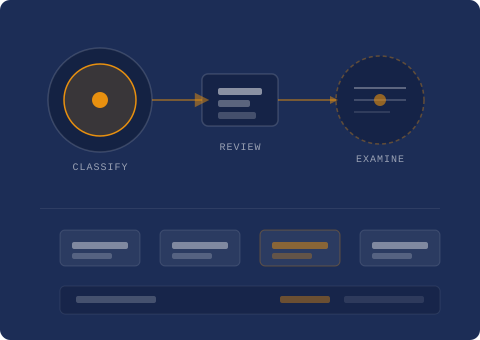
What the Platform Is Designed to Do
Zeqalimorix is built around four core functions. Each one contributes to the platform's overall purpose: making structured information accessible, reviewable, and clearly organised for the user.
Information Classification
Content within Zeqalimorix is assigned to a defined classification layer. This process organises material into coherent categories so that users do not encounter unstructured or unlabelled content. Classification is applied consistently, which means that navigating from one section to another produces a predictable result. Users can orient themselves within the platform using the category structure rather than having to search through unorganised material.
Structured Data Review
The review interface presents information in a consistent visual format. Each data record or content block follows the same layout convention, making it straightforward to compare entries, identify patterns, and determine which items are relevant to your needs. The structured review function does not generate new content; it organises existing material so that reviewing it is efficient and unambiguous.
Organised Content Pathways
Navigation within Zeqalimorix follows organised pathways that connect related sections of content. Rather than presenting every available item as a flat list, the platform maps content relationships so that users can move logically from one area to another. These pathways reduce the need to backtrack and help users understand how different parts of the information set relate to one another.
Support and Enquiry Interface
For users who need assistance or who wish to request access to specific areas of the platform, Zeqalimorix provides a defined support channel. Enquiries are routed to the support team through the contact form on the Enquiries page. The team can provide clarification, process access requests, and respond to questions about the platform's scope. Response times are not committed to in advance; the team reviews all enquiries in order of receipt.
The Information Review Sequence
Zeqalimorix organises the user's interaction with the platform into a clear sequence. The steps below describe how content is encountered, reviewed, and acted upon within the system.
Content is received and assigned a classification
When new material enters the platform, it is assigned to the most appropriate category based on its characteristics. This classification is applied before the content becomes available to users, ensuring that the structured view is always coherent.
The review interface presents classified content
Once classified, content is rendered through the review interface in a consistent format. The layout follows a fixed template for each content type, which makes individual records easy to scan and compare without visual inconsistency.
Users navigate through organised pathways
From the review interface, users can follow defined pathways to related content sections. These connections are built into the platform's structure, not generated dynamically, which means the navigation is predictable and reliable across sessions.
Access requests and enquiries are routed to support
If a user requires access to a restricted section or has a question the platform cannot answer directly, the enquiry is submitted through the contact form. The support team then handles it according to the established process.
Ready to Engage with the Platform?
If you have reviewed the functions described here and would like to proceed, the Enquiries page is the appropriate next step. The support team can assist with access requests and answer questions not addressed on this site.